How Does a WhatsApp Chatbot Work? A Complete Guide to WhatsApp Flow & Automation
Published on: June 24, 2026
Textora SMS Textora Technologies 2.0
Customer expectations have changed dramatically in the last few years. They don’t want to wait for business hours anymore or get stuck on long support queues. Instead, they want instant answers, personalised help and smooth communication — around the clock.
This is where a WhatsApp Chatbot powered by the WhatsApp Business API becomes a game changer.
Whether it’s answering customer enquiries, capturing leads, booking appointments or processing orders, a WhatsApp chatbot can automate conversations while providing a seamless customer experience.
In this article, we will explore how a WhatsApp chatbot works, the process of creating WhatsApp conversation flows, and how businesses can automate customer communication with Textora Technologies (TextoraSMS).
What is a WhatsApp Chatbot?
A WhatsApp Chatbot is an automated virtual assistant that talks to customers on WhatsApp through predefined conversation flows, artificial intelligence (AI) and the WhatsApp Business API.
Instead of waiting for a customer support executive, users get instant responses based on their queries.
A chatbot is able to:
Answer the FAQs
Capture customer information
Bookings
Share catalogues of products
Send invoice’s
Collect money
Generate leads.
Route chats to human agents
Offer 24/7 customer support
What is WhatsApp Business API?
The WhatsApp Business API is for businesses that need to talk to thousands of customers securely and effectively.
Unlike the regular WhatsApp Business App, the API allows businesses to:
Automate dialogues
combine CRM systems
ERP software link
Create chatbots
Make notifications
Handle many agents
Approved template message to broadcast
Analyse how customers engage with the brand
The backbone of any WhatsApp chatbot is an API.
How do WhatsApp chat bots function?
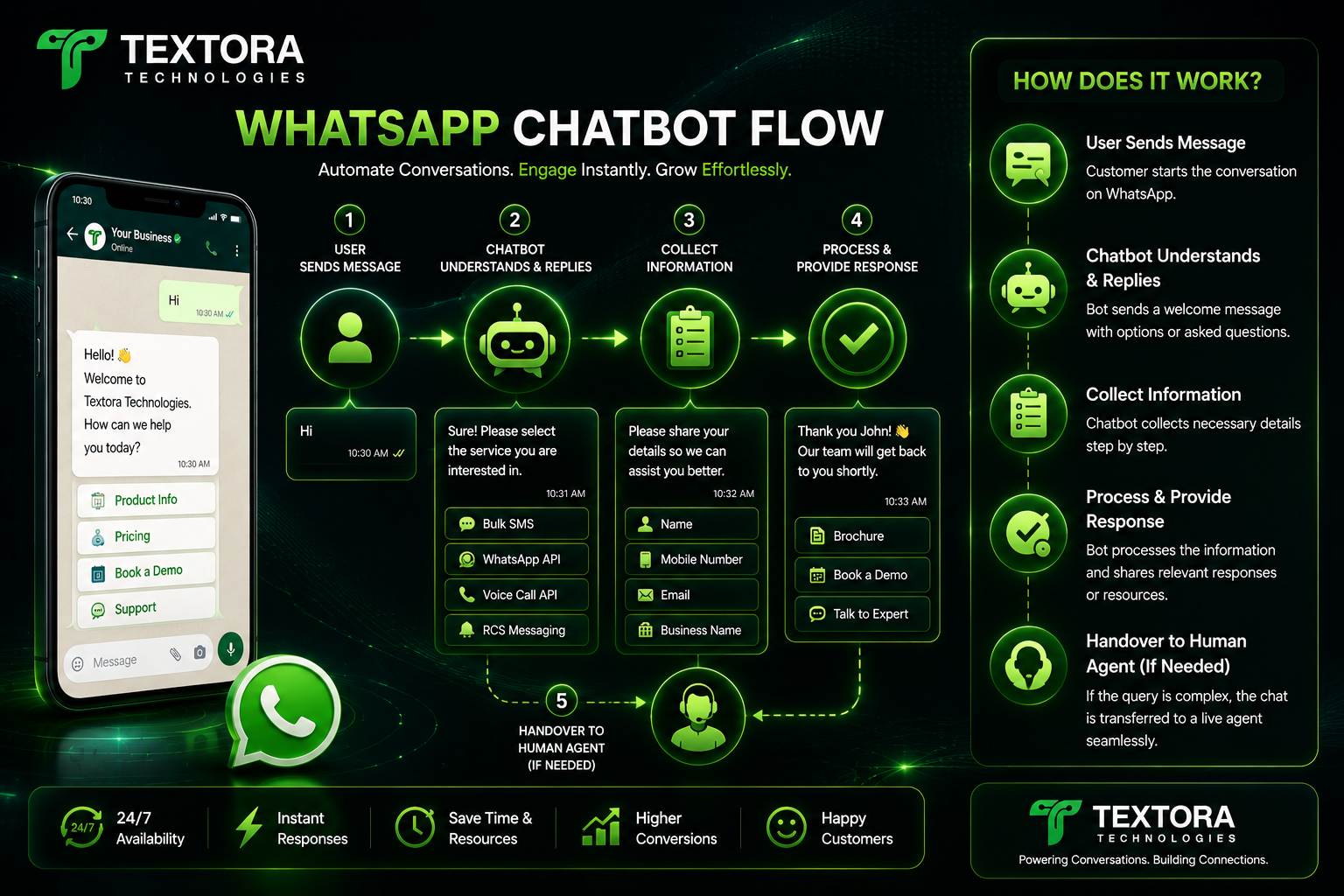
A WhatsApp chatbot has a pre-determined flow of conversation to understand the queries of the customers and answer them appropriately.
This is how the process works:
Step 1: The Customer Begins the Conversation
A customer can start a chat by:
Clicking a WhatsApp button on your site
Use a QR code scanner
Clicking a WhatsApp Click to Ad
How to Visit Your Google Business Profile
Opening a WhatsApp Link
Sending a direct message
Sample:
Hey
Step 2: Greeting message
The chatbot immediately responds with a greeting.
Sample:
Hi 👋
Welcome to Textora Technologies.
What can we do to assist?
1️⃣ Product details
2️⃣ Price
3. Schedule a Demo
4️⃣Customer Support
5️⃣ Speak to sales
Step 3: Customer Makes a Choice
Assume the customer selects:
2️⃣ Price
The chatbot then either shows the price information or asks further questions.
Step 4: Flow Questions
The chatbot collects customer data one by one.
For example:
What's your name?
↓
John Smith
↓
Enter your email address.
↓
[email protected]
↓
What kind of service are you interested in?
Bulk Smses
WhatsApp Business API
Voice Calls APIs
RCS Chat
Step 5: Capture Data
The customer information is stored within the chatbot:
Customer Relationship Management
googlesheets
ERP
Database
Lead Management Software
That means you don’t have to enter the data manually.
Step 6: Automatic Reply
Depending on the customer’s answers, the chatbot gives relevant information.
For example:
Product brochure.
Price Sheet PDF
About the company
Book Your Demo Link
Link for Payment
Website link
Contact info
Step 7: Transfer to Human Agent
If the chatbot can’t resolve the query, it hands the conversation over to a live support executive.
The customer never has to restart the conversation.
Sample WhatsApp Chatbot Flow
Client
↓
Hey
↓
A Welcome Message
↓
Choose a Service
↓
Bulk Smses
↓
Person or Business?
↓
Enterprise
↓
Name of Company
↓
Phone Number
↓
E-mail Address
↓
Service of Interest
↓
Price Sheet PDF
↓
Sales Team Heads Up!
↓
Live Agent (Optional)
↓
Chat Ended
WhatsApp Chatbot Flows: Types
Lead Gen Flow
Includes:
Name:
Telephone number
E-mail
Company Name
Service Requirements
It automatically pushes leads to the sales team.
Appointment Booking Process
Customer chooses:
Date:
When
Service
Branch
The appointment is self-confirmed.
Customer Service Flow
Grips:
Status of Order
Filing a complaint
Status of Refund
Technical Support
FAQs
E-commerce Process
Customer benefits:
Search products
See catalogue
Add to Basket
Make orders
Shipping tracking
Get invoices
Payment Flows
The chatbot can send:
Payment Links
QR Codes
PDF Invoices
Customers can pay directly from WhatsApp.
Advantages of WhatsApp Chatbots
Reasons why businesses choose WhatsApp chatbots:
Respond immediately
cut back on customer support costs
Capture high quality leads
boost sales conversions
Boost customer satisfaction
Work 24 hours a day
Manage thousands of conversations at once
Integrate with CRM tools
Automating routine tasks
Less human error
Can WhatsApp Chatbots Leverage AI?
Yes.
Today, WhatsApp chatbots can use AI to:
Comprehend customer intent
Complex questions to answer
Recommending products
Provide multilingual support.
Sign up to conversations
Customise replies
AI-powered chatbots provide a more natural and engaging experience for customers.
Use cases of WhatsApp chatbot
Chatbots are used by businesses in all industries for various reasons.
Wellness
Book an appointment
Physician availability
Share this story
Medication Reminders
Education.
Enrolment questions
Information about the Course
Fees Payment
Student support
Property and Real Estate
Real estate listings
Site visit bookings
Qualification of leads
Shopping on line
Product suggestions
Order status
Returns and Refunds
Payment reminders
Financial
Loan questions
EMI notices
Account updates
Why Textora Technologies for Business
At Textora Technologies (TextoraSMS) we develop intelligent WhatsApp chatbot solutions, customised to your business needs.
We offer:
WhatsApp Business API Reference
Build Your Own Chatbot
WhatsApp FlowDesign
Integrate with CRM
ERP Integration
AI Chatbot Solutions:
Automated Lead Generation
Appointment Booking Bots
Automating Customer Support
Integration of Payment
Dashboard Analytics
Multiple Agent Live Chat
Broadcast message
Bulk SMS Service
If you are a startup or a large enterprise, we help you automate customer communication and provide a professional and personalised experience.
Frequently asked questions FAQs
Is the WhatsApp bot available 24/7?
Yes. A chatbot is available 24/7 and can answer to customers anytime, even outside business hours.
Can a chatbot escalate chats to a human agent?
Yes. When needed, the chatbot can seamlessly pass on the conversation to a live support executive.
“Can WhatsApp chatbots gather customer information?
Definitely. Chatbots are a secure way to collect names, phone numbers, email addresses, business information and other lead data.
Yes, you can integrate your CRM with a WhatsApp chatbot.
Yes. The WhatsApp Business API can be integrated with CRM, ERP, Google Sheets and custom business apps.
WhatsApp chatbot for small business?
Yes. Automation, faster customer responses and better lead management can benefit businesses of any size.
Summary
A WhatsApp chatbot is not just an automated response system; it’s a robust business tool that enhances customer engagement, automates mundane tasks, generates leads, and provides instant assistance. With the WhatsApp Business API, businesses can leverage structured conversation flows and provide continuous, 24/7 communication at a much lower operating cost.
Textora Technologies (TextoraSMS) works with businesses to build and deploy custom WhatsApp chatbot solutions that integrate with CRMs, automate workflows, and deliver outstanding customer experiences. Looking for a lead generation bot, appointment booking system, customer support chatbot or AI-powered automation? Our experts can build a solution that fits your business.
Customer expectations have changed dramatically in the last few years. They don’t want to wait for business hours anymore or get stuck on long support queues. Instead, they want instant answers, personalised help and smooth communication — around the clock.
This is where a WhatsApp Chatbot powered by the WhatsApp Business API becomes a game changer.
Whether it’s answering customer enquiries, capturing leads, booking appointments or processing orders, a WhatsApp chatbot can automate conversations while providing a seamless customer experience.
In this article, we will explore how a WhatsApp chatbot works, the process of creating WhatsApp conversation flows, and how businesses can automate customer communication with Textora Technologies (TextoraSMS).
What is a WhatsApp Chatbot?
A WhatsApp Chatbot is an automated virtual assistant that talks to customers on WhatsApp through predefined conversation flows, artificial intelligence (AI) and the WhatsApp Business API.
Instead of waiting for a customer support executive, users get instant responses based on their queries.
A chatbot is able to:
Answer the FAQs
Capture customer information
Bookings
Share catalogues of products
Send invoice’s
Collect money
Generate leads.
Route chats to human agents
Offer 24/7 customer support
What is WhatsApp Business API?
The WhatsApp Business API is for businesses that need to talk to thousands of customers securely and effectively.
Unlike the regular WhatsApp Business App, the API allows businesses to:
Automate dialogues
combine CRM systems
ERP software link
Create chatbots
Make notifications
Handle many agents
Approved template message to broadcast
Analyse how customers engage with the brand
The backbone of any WhatsApp chatbot is an API.
How do WhatsApp chat bots function?
A WhatsApp chatbot has a pre-determined flow of conversation to understand the queries of the customers and answer them appropriately.
This is how the process works:
Step 1: The Customer Begins the Conversation
A customer can start a chat by:
Clicking a WhatsApp button on your site
Use a QR code scanner
Clicking a WhatsApp Click to Ad
How to Visit Your Google Business Profile
Opening a WhatsApp Link
Sending a direct message
Sample:
Hey
Step 2: Greeting message
The chatbot immediately responds with a greeting.
Sample:
Hi 👋
Welcome to Textora Technologies.
What can we do to assist?
1️⃣ Product details
2️⃣ Price
3. Schedule a Demo
4️⃣Customer Support
5️⃣ Speak to sales
Step 3: Customer Makes a Choice
Assume the customer selects:
2️⃣ Price
The chatbot then either shows the price information or asks further questions.
Step 4: Flow Questions
The chatbot collects customer data one by one.
For example:
What's your name?
↓
John Smith
↓
Enter your email address.
↓
[email protected]
↓
What kind of service are you interested in?
Bulk Smses
WhatsApp Business API
Voice Calls APIs
RCS Chat
Step 5: Capture Data
The customer information is stored within the chatbot:
Customer Relationship Management
googlesheets
ERP
Database
Lead Management Software
That means you don’t have to enter the data manually.
Step 6: Automatic Reply
Depending on the customer’s answers, the chatbot gives relevant information.
For example:
Product brochure.
Price Sheet PDF
About the company
Book Your Demo Link
Link for Payment
Website link
Contact info
Step 7: Transfer to Human Agent
If the chatbot can’t resolve the query, it hands the conversation over to a live support executive.
The customer never has to restart the conversation.
Sample WhatsApp Chatbot Flow
Client
↓
Hey
↓
A Welcome Message
↓
Choose a Service
↓
Bulk Smses
↓
Person or Business?
↓
Enterprise
↓
Name of Company
↓
Phone Number
↓
E-mail Address
↓
Service of Interest
↓
Price Sheet PDF
↓
Sales Team Heads Up!
↓
Live Agent (Optional)
↓
Chat Ended
WhatsApp Chatbot Flows: Types
Lead Gen Flow
Includes:
Name:
Telephone number
Company Name
Service Requirements
It automatically pushes leads to the sales team.
Appointment Booking Process
Customer chooses:
Date:
When
Service
Branch
The appointment is self-confirmed.
Customer Service Flow
Grips:
Status of Order
Filing a complaint
Status of Refund
Technical Support
FAQs
E-commerce Process
Customer benefits:
Search products
See catalogue
Add to Basket
Make orders
Shipping tracking
Get invoices
Payment Flows
The chatbot can send:
Payment Links
QR Codes
PDF Invoices
Customers can pay directly from WhatsApp.
Advantages of WhatsApp Chatbots
Reasons why businesses choose WhatsApp chatbots:
Respond immediately
cut back on customer support costs
Capture high quality leads
boost sales conversions
Boost customer satisfaction
Work 24 hours a day
Manage thousands of conversations at once
Integrate with CRM tools
Automating routine tasks
Less human error
Can WhatsApp Chatbots Leverage AI?
Yes.
Today, WhatsApp chatbots can use AI to:
Comprehend customer intent
Complex questions to answer
Recommending products
Provide multilingual support.
Sign up to conversations
Customise replies
AI-powered chatbots provide a more natural and engaging experience for customers.
Use cases of WhatsApp chatbot
Chatbots are used by businesses in all industries for various reasons.
Wellness
Book an appointment
Physician availability
Share this story
Medication Reminders
Education.
Enrolment questions
Information about the Course
Fees Payment
Student support
Property and Real Estate
Real estate listings
Site visit bookings
Qualification of leads
Shopping on line
Product suggestions
Order status
Returns and Refunds
Payment reminders
Financial
Loan questions
EMI notices
Account updates
Why Textora Technologies for Business
At Textora Technologies (TextoraSMS) we develop intelligent WhatsApp chatbot solutions, customised to your business needs.
We offer:
WhatsApp Business API Reference
Build Your Own Chatbot
WhatsApp FlowDesign
Integrate with CRM
ERP Integration
AI Chatbot Solutions:
Automated Lead Generation
Appointment Booking Bots
Automating Customer Support
Integration of Payment
Dashboard Analytics
Multiple Agent Live Chat
Broadcast message
Bulk SMS Service
If you are a startup or a large enterprise, we help you automate customer communication and provide a professional and personalised experience.
Frequently asked questions FAQs
Is the WhatsApp bot available 24/7?
Yes. A chatbot is available 24/7 and can answer to customers anytime, even outside business hours.
Can a chatbot escalate chats to a human agent?
Yes. When needed, the chatbot can seamlessly pass on the conversation to a live support executive.
“Can WhatsApp chatbots gather customer information?
Definitely. Chatbots are a secure way to collect names, phone numbers, email addresses, business information and other lead data.
Yes, you can integrate your CRM with a WhatsApp chatbot.
Yes. The WhatsApp Business API can be integrated with CRM, ERP, Google Sheets and custom business apps.
WhatsApp chatbot for small business?
Yes. Automation, faster customer responses and better lead management can benefit businesses of any size.
Summary
A WhatsApp chatbot is not just an automated response system; it’s a robust business tool that enhances customer engagement, automates mundane tasks, generates leads, and provides instant assistance. With the WhatsApp Business API, businesses can leverage structured conversation flows and provide continuous, 24/7 communication at a much lower operating cost.
Textora Technologies (TextoraSMS) works with businesses to build and deploy custom WhatsApp chatbot solutions that integrate with CRMs, automate workflows, and deliver outstanding customer experiences. Looking for a lead generation bot, appointment booking system, customer support chatbot or AI-powered automation? Our experts can build a solution that fits your business.